On October 6, 2026, Patchstack reported an active campaign exploiting stored cross-site scripting vulnerabilities in WordPress plugins to establish administrator-level access and persistence . The attackers exploit two unrelated and recently disclosed flaws, one in WPC Product Bundles for WooCommerce and one in Ninja Forms, to run JavaScript inside a logged-in administrator's browser. That script installs a malicious plugin and can establish several independent ways back into the site. Patchstack observed the first exploitation on October 4, 2026, days after the vulnerabilities were made public. The campaign stands out because it hides the accounts and files it creates from the people who own the site.
In this blog the focus is how the attack moves from a stored script to a hidden administrator, and why the site owner may never notice. It covers how the script is delivered, what it does inside an admin session, the persistence it leaves behind, and what affected organizations should check. The technical detail comes from Patchstack's analysis of the campaign.
1. How stored scripts reach an administrator's browser
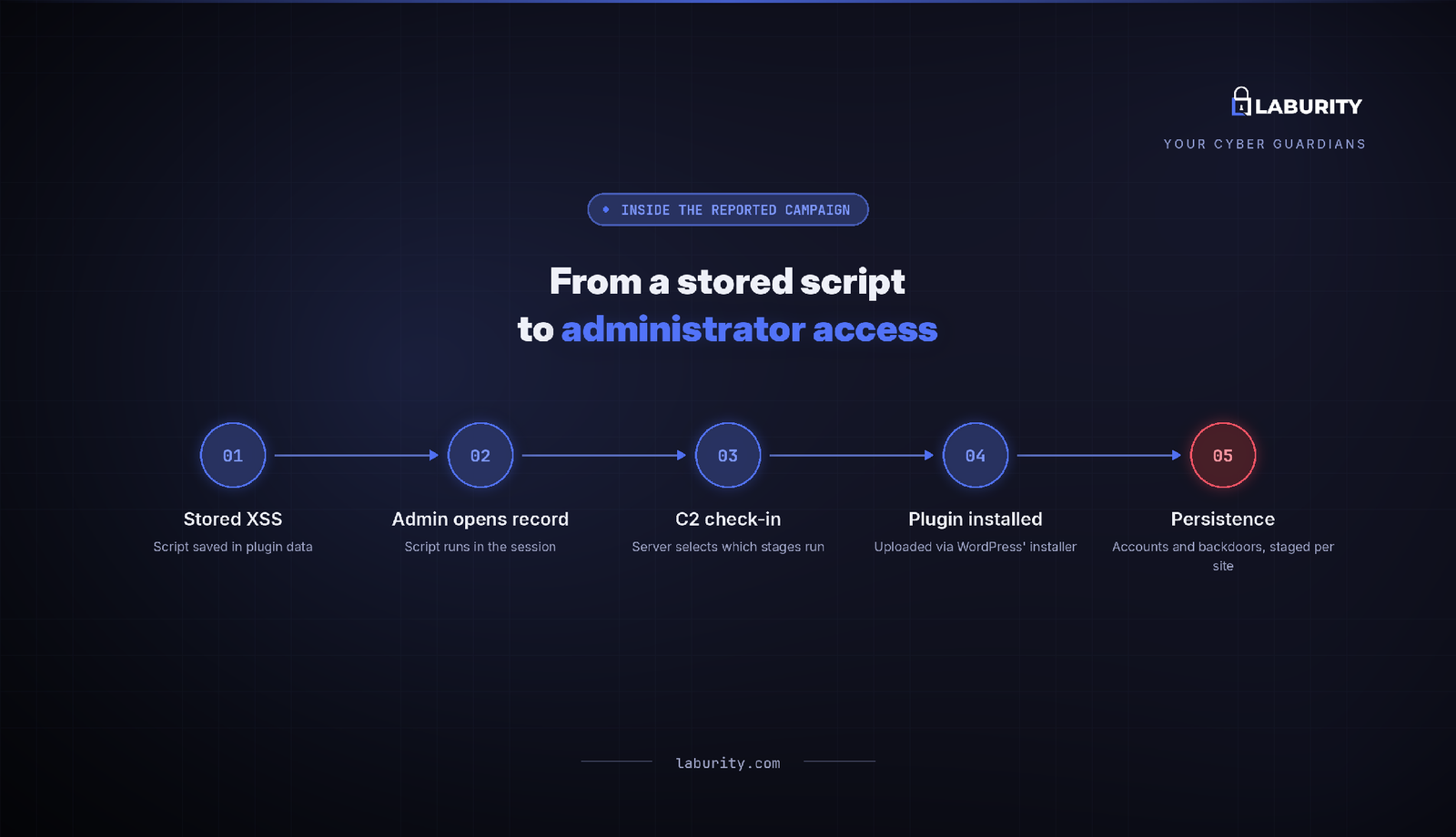
Both flaws are stored XSS, tracked as CVE-2026-93836 in WPC Product Bundles, for versions up to 8.6.6, and CVE-2026-94504 in Ninja Forms, for versions up to 3.15.3. In the first, an attacker places a script tag in a product bundle quantity field and prefixes it with a valid number, so the input passes validation while the markup survives into WooCommerce order metadata. In the second, a form submission breaks out of a textarea and injects an image tag with an onerror handler. Both payloads sit in data that a store operator or form reviewer later opens inside wp-admin. When the administrator views that record, the stored script loads a remote file from the attacker's server and runs in their authenticated session.
2. What the payload does inside an admin session
Because the script runs as the administrator, it needs no stolen cookies and no password. Patchstack reports that it first checks in with a command server at imgcdn1.com to learn which stages are still needed. It then opens the plugin upload page, reads the installer nonce, downloads a malicious plugin named WP Smart Thumbnails, and submits it through the normal WordPress installer. The plugin disguises itself by inverting the usual access check, so it appears inactive in wp-admin yet runs on a direct request. From there the payload creates an administrator account using credentials supplied by the command server and triggers a second installer script that sets up the rest of the persistence.
3. The persistence the campaign can establish
Patchstack reports that the payload checks in with the command server before acting, and the server decides which stages run on a given site, so a compromised site may receive only some of what follows. The campaign can create a visible administrator account with an ordinary looking name such as support or updater. It can add a hidden administrator that a must-use plugin filters out of the Users screen and the role counts, so it does not show in the dashboard. It can install a login token, appended to the login URL, that authenticates the visitor as the site's oldest administrator without a password and survives password resets on other accounts. It can also leave an unauthenticated file manager inside the disguised plugin that reads and writes files over direct HTTP. The installer backdates the files it drops, so they look older than WordPress itself.
4. Who is exposed and what to check
The two plugins carry large install bases, with Ninja Forms alone on more than 500,000 sites, so the exposed population is wide. Updating WPC Product Bundles to 8.6.7 and Ninja Forms to 3.15.4 closes the entry point, but a site that already ran the payload needs more than a patch. Administrators should compare the accounts in the database against what wp-admin displays, inspect the must-use plugins directory, and remove the dropped files and campaign options. Because the entry point is a stored script the application failed to encode, secure code review helps catch this class of flaw in plugin and custom code before release. For organizations running these platforms, web application penetration testing shows how far an exploitable XSS could actually reach across a site.
A single stored script running in an administrator's browser was enough to seed hidden, persistent access into these sites. Patching the plugin is only the first step, because a site that already executed the payload should be treated as fully compromised and cleaned on that basis.
If you're looking to assess your organization's exposure to similar risks, Scan your organization's exposure, explore Laburity, or book a consultation.